11 June 2026We are now up to version 4.2.5, and so far, everything is working as it should. All other versions will become obsolete in the very near future. I will make an announcement on the forum before that happens.
15 Nov 2025 I inadvertently left my login information in the user.cfg file when I zipped up the latest version, and someone filed a flight report that credited me for the flight. I have since changed my password and corrected the mistake. On a positive note, v4.2.0 seems to function normally. New zip has been uploaded and is available. PLEASE BE SURE TO ENTER YOUR LOGIN INFORMATION ON THE SETTINGS TAB!
09 Nov 2025: Version 4.2.0 has been released, but our servers are not yet ready for it. Please do not try to use it yet. I will post on the forum when the server files and the new downlaod package are completed.
15 Oct 2025: It is no longer necessary to sign up to use fsACARS v4. I was able to encrypt our APS passwords so that they will work without the need for separate passwords.
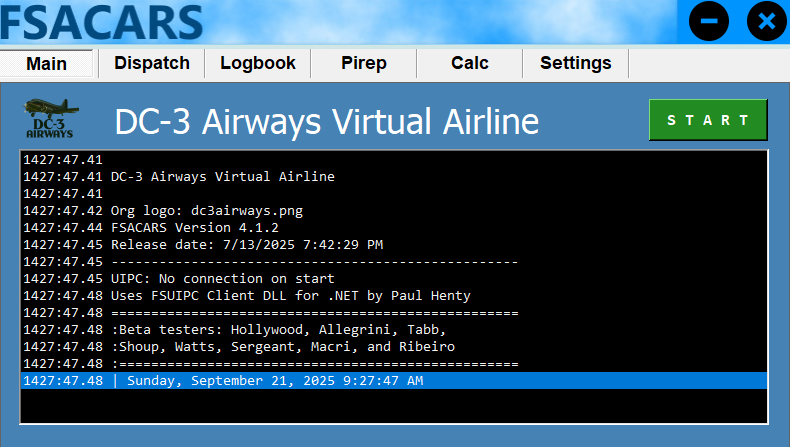
Finally we have a new version of fsACARS!
This version is a huge step up from V2.996, which is what we have been using for years. As you can see from the image above, there are quite a few new features.One of those features is something we've been asking for: Auto-start and auto stop! Another feature that has been added is password encryption. It's better security, but if you forget your password, it cannot be recovered.
- Installation is as easy as before. Download the zip file from the menu above and extract it wherever you like.
- Find fsacars.exe in the extracted folder and run it.
- Click on the settings tab and enter your DCA number and password.
- Set other settings as desired.
There is also a new script to add pireps to our database automatically, same as before, so there are a couple of things to be aware of.
- If you use anything other than your pilot number when you log in on fsACARS, your pirep will not be recorded and an error will be returned to the fsACARS app.
- If you use MS2020 or MS 20204, you must have FSUIPC v7.x.x installed. Anything less than v7 will nor work.
- FSUIPC v6 will work with FSX and P3D.
-
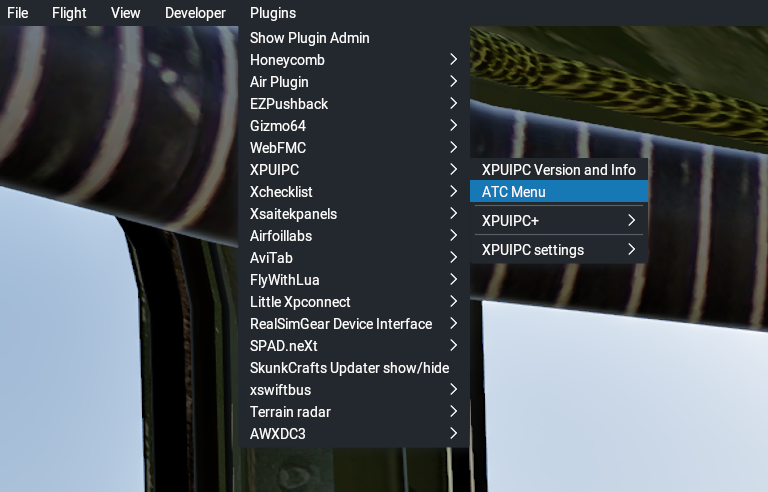
If you use X-Plane 11 or 12, you will need XPUIPC's latest version. Once the sim is started, go to the Plugins tab, find XPUIPC, and select ATC Menu.
-
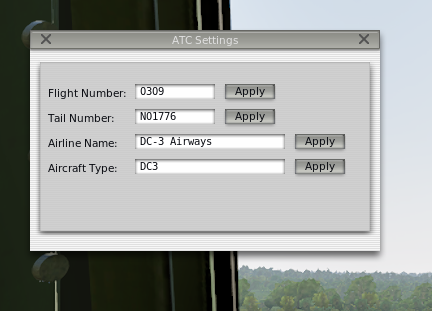
Fill out the form similar to how I have mine filled out. The field that REALLY matters is the aircraft type. This MUST be the ICAO aircraft type for your aircraft. For example, any variant of a Douglas DC-3 is type DC3. This includes a C-47. Alhough it has a different nomenclature, it is still type DC3.
As was the case with the older version of fsACARS, there is a large amount of data available to be pulled and displayed. We are only scratching the surface of what this app is capable of. I am still working on a page to display flight reports which include a lot of that data and I am fine-tuning a map.