

|
To minimize the possibility of submitted PIREP information being either totally lost or not displaying correctly in your account and in the 'Recent PIREPs' section, it is most important that after you have entered your flight information and hit |
||
 |
||
|
the Submit button, and before you log off or continue to submit a further PIREP, that you wait several seconds (Five or more suggested) for the information to be transferred to the server. Basically, enter your information, hit 'Submit' and wait a while. It may save you, and the Admin team, considerable time and trouble! |
||
The PIREP will be given as part of the flight plan for each individual event. The image below shows a typical layout and the position of the PIREP information.
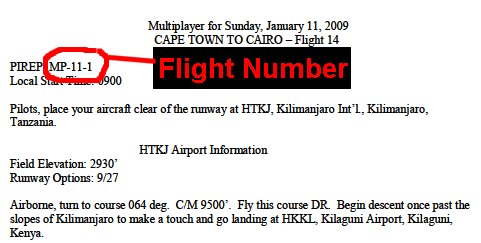
To submit a PIREP after making a Free Flight all you need to do is
include the ICAO codes for the departure and arrival airports. If a flight
is broken into legs, the ICAO code for the stop, or stops made during a
flight do not have to be recorded but you may optionally mention this in the
Comments section when reporting the flight. An example of a Free Flight
PIREP is shown below...
Pilot #: 0393
Name: Robert Betts
Flight Number: KVPZ-KIND
Minutes Flown: 51
Comments: Valparaiso, IN to Indianapolis, IN
KVPZ-VHP-KIND
FS9 ATC - IFR @ 5000 ft
Official VATSIM events are assigned a flight number by the host similar to the way that is used for MP sessions. If you fly by yourself while online with VATSIM then simply use the rules for free flight to create a PIREP number.
The format of the PIREP for "Flights" is not so formalised as that for charters. However, the image below shows a typical layout and the position of the PIREP information.
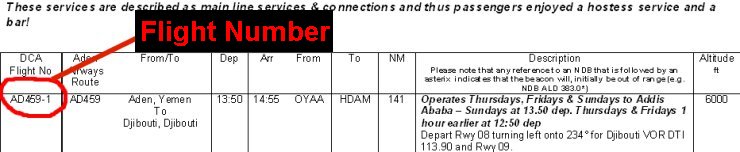
The 6 acceptable Type Rating PIREP Flight Numbers required to receive the
10 hours bonus are as follows:
1201
1202
1203
1204
1205
1206
For charter flights the format of the PIREP is given at the end of each
leg of the charter instructions. In general it follows the following
format:
Charter writing pilot number: 3 or 4 digits
Charter sequence number: 2 digits
Charter leg number: 2 digits - may be omitted if there is only one leg

When submitting a PIREP it is vital that the
information is entered in the correct format. PIREPs are regularly
monitored, and where it is seen that a Pilot has submitted an incorrect
PIREP, he will be contacted by a member of staff to discuss the option to be
taken. This
obviously takes a great deal of effort to administer and so it would be
greatly appreciated if pilots could check the format of their PIREP before
submitting as detailed below.
The errors encountered most often in PIREPS are incorrect Flight Numbers.
For that reason examples of Flight Numbers for each of the different venues
of flying at DCA are shown below. A few common examples of
unacceptable Flight Numbers would be (a blank entry), 0000, or a pilots 4
digit pilot number. And while letters appearing in Flight Numbers can
be in either case they would be much clearer and easier to read in upper
case. And the only other character normally used in flight numbers is
the dash, or hyphen ( - ), so please, don't use any other characters such as
spaces, colons, semicolons, underscores, less than (<), or greater than (
>), etc.
Please report the flight time in whole minutes only, rounding up or down
where necessary.
It basically comes down to being honest!
The basic rule is 'Wheels rolling to wheels stop'. What this means is....
Take-off - If you decide to start from the terminal parking area, start the
timer when you release the brakes. If you decide to start from the runway
threshold, start the timer when you release the brakes.
Landing - after landing and you wish to taxi to the terminal, stop the timer
when wheels stop when you are parked. If you don't wish to taxi to the
terminal area, stop the timer when wheels stop at the end of the landing
roll.
The difference between starting from the terminal parking area, or whether
you wish to terminate the flight when you stop at the end of the landing
roll comes down to what YOU enjoy doing. By far the most important aspect of
reporting flight time is only reporting the time you spend watching those
instruments. Exaggerated times impress no one but those reporting them!
Please report the flight time in whole minutes, rounding up or down where
necessary. For instance a flight of 27 minutes and 36 seconds should
be reported as 28 minutes whilst a flight of 27 minutes and 14 seconds
should be reported as 27 minutes.